
In a world where visuals are everything, having striking images can make the difference between standing out or fading into the background. Whether you’re building your personal brand or need eye-catching images for an eCommerce business, visual quality is crucial. However, not everyone has the budget or time to hire a professional photographer.
Just starting out and don’t have the gear or a hefty budget? Don’t worry.
With the right tools, you can create high-quality images that capture attention without spending a fortune. In this article, I’ll show you how three AI tools—Pebblely, Mockey, and Artflow—can help you generate stunning visuals for both products and personal use, all without spending a single penny.
1. Pebblely: The Ideal Solution for eCommerce Product Images
If you run an online store, you know how important it is to showcase your products in the best possible light. Product images need to be not only clear but also appealing to grab customers’ attention and improve conversion rates. Pebblely is an AI tool designed specifically for this purpose.
What is Pebblely?
Pebblely is a platform that lets you create product images with customisable backgrounds, without the need for complex setups or costly photo shoots. With Pebblely, you can upload a basic image of your product and automatically generate different high-quality versions that fit various contexts or aesthetics.
Use Cases in eCommerce
Imagine you’ve just launched a new product line and need images for your website, social media, and ads. Instead of hiring a photographer for each variation, you can use Pebblely to create multiple images from the comfort of your desk.
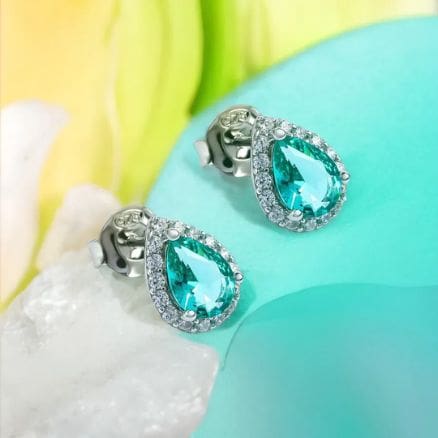
Here’s an image I created with Pebblely. Can you tell the difference from a studio photo?
My Experience with Pebblely
- Pebblely allows you to create professional product photos with AI. You only need a photo of your product, which doesn’t even need the background removed; a high-quality JPG photo is sufficient, and the tool will remove the background for you.
- Then, you select the style of the photo you want. There are different options for various types of products, such as furniture, cosmetics, and more. In my case, I chose a photo of some earrings and selected a studio-style background.
- The result was impressive: I simply downloaded the image and it was ready to use in ads or product catalogues. The photo quality is quite good and very realistic, to the point where you wouldn’t really notice a difference from a professional photo.
A 30-second summary of how to use Pebblely to create a catalogue photo.
2. Mockey: Create Realistic Mockups to Present Your Designs
Presentation is key when it comes to selling an idea or product. Mockey is an AI tool that allows you to create realistic mockups without the need for physical prototypes. Whether you’re designing packaging, an app, or even a physical product, Mockey can help you visualise your project professionally.
What is Mockey?
Mockey is a platform that generates high-quality mockups from designs or products. You can choose from a variety of templates and scenarios to showcase your products in the best possible way. From product packaging to digital interfaces, Mockey provides the flexibility to create impactful presentations without the additional cost of production.
Practical Applications
Suppose you’re developing a new packaging design for a product and need to present it to a client or internal team. With Mockey, you can simulate how the product will look in various scenarios, from store shelves to 3D views, making design approval and decision-making easier.
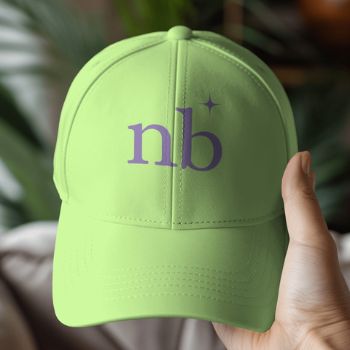
I didn’t expect the result to be so impressive. Look how it turned out! <3
My Experience with Mockey
- Mockey is excellent for creating mockups, which are realistic photos of a product with your design. For example, if you’re a graphic designer and want to see how a t-shirt would look with your design, this tool allows you to visualise it as if it were already finished, without needing to print the t-shirt or take photographs.
- I used Mockey to place my logo on a cap. I loved the flexibility of the tool: I could adjust the logo size, tweak the image, and even change the product’s colour.
In 20 seconds, I’ll show you how to create perfect mockups with Mockey.
- In this case, I changed the cap’s colour from white to green, and the result was incredibly realistic. Additionally, while the tool offers paid options, the 800 x 1000 image size is more than adequate, and the quality is excellent.
3. Artflow: Professional Images for Your Personal Brand Without a Photographer or Studio
Creativity is a distinguishing factor, especially in branding and marketing campaigns. Artflow is an AI tool that lets you explore your creativity without limits, generating professional images for your personal brand or visual storytelling without needing to be an illustrator.
What is Artflow?
Artflow is a platform that uses artificial intelligence to create unique images and characters from the photos you provide. Upload your photos, and Artflow will work its magic, placing you in fantastic scenarios with a very realistic appearance.
This tool can help you create professional photos for your personal brand or images that add a spark to your content and storytelling.
Applications in Branding and Creativity
Artflow is a platform where you can create professional photos of yourself, for example, for your professional website in formal attire. It’s generally ideal for personal brand photos. You can also have some fun creating fantasy photos to add a unique touch to your social media posts and grab attention.
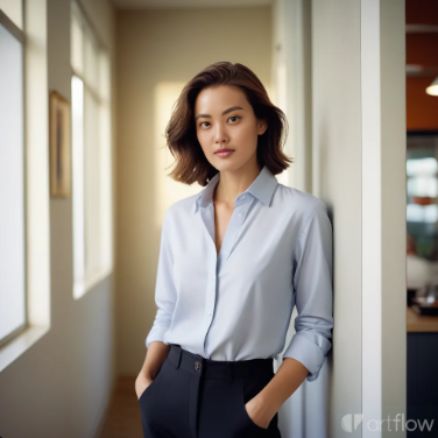
This is what I mean by photos for your personal brand 😉
My Experience with Artflow
- The quality of the images I’ve generated has been very realistic. For instance, I created an image of myself dressed from another era and performing magic, which I could use in a blog or to add a creative touch to a LinkedIn post.
- Additionally, Artflow gives you 100 free credits per day, more than enough to thoroughly test the tool. The experience has been excellent, and the ease of creating unique images with this tool really adds distinctive value to any project.

The final result.
Conclusion
Artificial intelligence has democratized the creation of professional images, allowing anyone, regardless of budget, to produce stunning visuals. Pebblely, Mockey, and Artflow are three tools that demonstrate how technology can simplify complex and costly processes, making them accessible and efficient.
If you’re looking to enhance the visual quality of your personal brand or business without breaking the bank, I invite you to try these tools.
- Experiment with Pebblely for product images,
- use Mockey for realistic mockups,
- and let Artflow inspire your creativity or provide striking photos for your personal brand.
One thing is clear: you don’t need to be a photography or graphic design expert; with the help of these AI tools, creating impactful visuals is within reach of any budget.
Do you want to keep discovering more secrets on how to optimise your digital marketing?
Follow me on LinkedIn to stay updated on my upcoming articles and useful tips.


Hey Natalia, Alfred, cofounder of Pebblely, here! Thanks so much for including Pebblely! Love the image you shared.
Hi Alfred! Thanks a lot for stopping by and commenting. Pebblely is an awesome tool, and it’s a pleasure to share it here. Congratulations on creating such an innovative platform!